
CustomBank
CustomApps LLCFinance
4.519.00 Reviews
- Version
- 2.12.1
- Installs
- 10.00K
- Age Rating
- Everyone
Screenshots
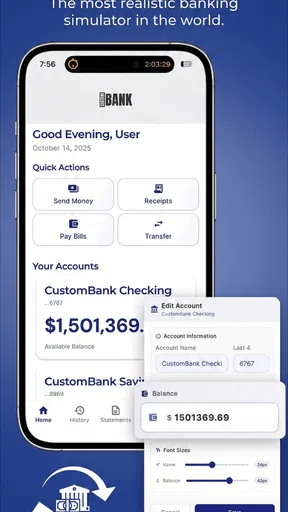
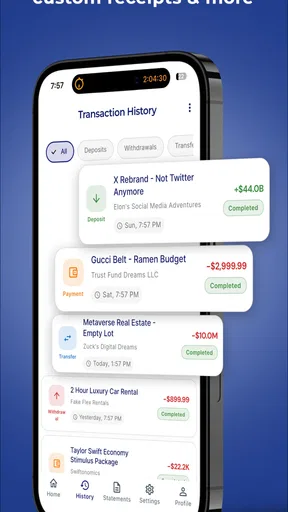
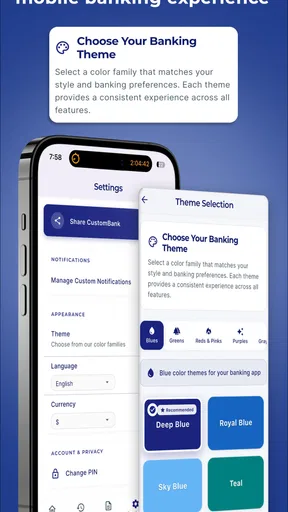
Our Review of CustomBank
 Analysis by Appyee
I approached CustomBank as a practice tool rather than a replacement for a real bank. That distinction matters from the first screen: this Finance app is built around handling a mobile-banking environment without using real money. I found the idea useful because it lets you explore financial routines with less pressure, but its value depends heavily on what you want to learn or rehearse.
Developed by CustomApps LLC, the app is free to install and aimed at Everyone. It has reached over ten thousand installs and holds a 4.5 average from more than three hundred ratings, which suggests that its basic concept has connected with a meaningful group of users. It was released on July 3, 2025, and the current version is 2.12.1 for devices running Android 6.0 or later.
What CustomBank actually offers
The central appeal is simple: I can practice mobile banking inside a simulated financial world instead of touching an actual account. The app’s emphasis on customization makes it more than a static demonstration. I can treat it as a safe place to think through how I would organize money, examine banking-style screens, and make decisions without the consequences that come with moving real funds.
That makes the app different from a standard budgeting tool. A budgeting app usually starts with your real income, bills, spending categories, or connected accounts. CustomBank is better understood as a controlled environment for learning and experimentation. It is not the place I would go to pay a bill, transfer genuine funds, check a real balance, or replace the security and reliability of a regulated financial service.
The distinction also answers an important question for parents, teachers, and beginners: the app’s Everyone rating makes it approachable, but an age rating should not be confused with financial instruction. I would still guide a younger user through the difference between a simulation and real banking, especially if the interface looks familiar enough to create confusion.
The cost is easy to understand, but the paid layer deserves attention
There is no purchase required to get started. That gives the app a low-risk entry point for anyone curious about simulated banking. I could first decide whether the practice format is useful before committing money, which is a much better arrangement than paying upfront for an idea that may not suit my learning style.
CustomBank also includes in-app purchases ranging from $1.99 to $99.99 per item. I would therefore treat the free access as the test-drive portion and examine each optional purchase carefully before spending. The broad range means that “free” does not automatically describe the full experience. The practical question is whether the unpaid version already supports the exercises I want to perform, or whether customization becomes more attractive only after paying.
Because the app is a simulator, paid value should be judged by usefulness rather than by the amount of virtual money or the appearance of a banking screen. A purchase can be worthwhile if it gives me a better environment for repeated practice, but it cannot provide the real-world value of an actual bank account. I would not buy anything expecting interest, insurance, account access, credit-building, or a financial return.
My cost rule is straightforward: use the free experience to test the learning value, then pay only for an option that solves a specific practice need. That keeps the spending decision separate from the excitement of customizing a new financial world.
Where the app delivers value
The strongest value is psychological. Real banking can make beginners hesitant because mistakes feel expensive and irreversible. A simulated environment removes that immediate risk. I can explore a banking-style workflow, pause when something is unclear, and repeat the exercise until the sequence feels familiar. That is useful preparation for someone opening a first account or learning how financial apps are generally organized.
I also see value for people who teach basic money habits. A parent could use the app as a conversation starter about balances, planned spending, and the difference between available funds and money that has already been assigned to a purpose. A tutor could ask a learner to describe what they would do before touching a real account. The app does not need to be a complete financial course to support those discussions; its controlled setting is the useful part.
Another worthwhile use is rehearsing decisions rather than memorizing terminology. Instead of only reading about banking concepts, I can think through a fictional situation: money arrives, a planned expense appears, and I decide how the financial world should reflect that change. The exercise is valuable because it encourages a habit of checking consequences before acting. That habit transfers better to real life than simply recognizing a button or label.
The customization angle adds a second layer. I would use it to build a scenario that resembles my own goals, such as separating everyday spending from a planned purchase or creating a fictional household budget. The important insight is to keep the scenario deliberately small at first. If I create an elaborate financial world immediately, the extra detail can become a distraction instead of a learning aid.
A practical everyday scenario
Imagine that I am helping a teenager prepare for their first debit account. Rather than handing over a real banking app and explaining everything while money is at stake, I would begin with a simple fictional month. We could decide what money is available, identify a few planned expenses, and review how each choice changes the simulated picture. Afterward, I would ask the learner to explain which decisions were deliberate and which were impulsive.
The benefit is not that the simulation predicts exactly how a particular bank works. Banks use different layouts, names, security steps, and account rules. The benefit is that the learner practices slowing down, checking details, and thinking about money as a limited resource. I would then verify every important real-world action separately when moving to an actual financial service.
An adult could use the same workflow before changing their own habits. For example, I might create a fictional version of a month in which I receive income, reserve money for a known bill, and leave a controlled amount for flexible spending. The exercise can expose whether my plan is realistic before I apply it to a real account. It is especially useful for someone who understands arithmetic but struggles with organizing choices.
Useful ways to get more from the simulator
My first recommendation is to give every practice session a question. “Can I organize this scenario clearly?” is better than opening the app without a purpose. Other useful questions might be whether a planned expense leaves enough flexibility, whether a beginner understands the order of a banking task, or whether a fictional setup is too complicated to follow. A clear question makes the customization meaningful.
Second, I would keep a short note outside the app describing what I intended to learn. This prevents the virtual environment from becoming a collection of attractive but forgotten details. After a session, I can compare the result with the original intention and decide whether the scenario taught anything. That small habit turns casual exploration into a repeatable practice routine.
Third, I would avoid treating a successful simulated action as proof that I understand a real bank’s process. The visual language may feel familiar, but real services can involve authentication, account restrictions, transaction timing, fees, and legal responsibilities. CustomBank is most valuable before that stage, as a rehearsal space. It should complement real financial education, not replace it.
Tradeoffs that affect the experience
The biggest limitation is also the app’s defining boundary: simulated money is not real money. That makes experimentation safer, but it also removes the urgency and complexity that teach some real-world lessons. A user may become comfortable with the flow while still being unprepared for actual account security, fraud warnings, overdraft rules, or the consequences of a genuine transaction.
I would also be cautious about confusing customization with financial planning. Building a personalized fictional world can make practice more engaging, but a polished setup does not automatically create a sound budget. The app is useful when I use customization to test decisions. It is less useful when I spend more time arranging the environment than examining the choices inside it.
The optional purchase structure is another tradeoff. Free access lowers the barrier to trying the app, while the range of paid items introduces a decision that some users may find distracting. I would not unlock anything simply because it is available. Before purchasing, I would ask whether the option improves a specific exercise, whether I will use it repeatedly, and whether the free experience already meets my needs.
There is also a comparison issue. A conventional budgeting app is the better choice if my priority is tracking real spending, importing transactions, setting practical reminders, or seeing where my money actually goes. A bank’s own app is the only appropriate choice for real account management. A spreadsheet may be better for someone who wants complete control over formulas and records. CustomBank earns its place when the goal is safe rehearsal and a more approachable fictional environment.
That does not make it inferior to those alternatives; it gives it a narrower job. I would choose it before a spreadsheet for an anxious beginner who needs a gentle introduction, but I would choose a spreadsheet over it for a detailed personal budget that must reflect real figures. I would choose a real bank app for every genuine transaction, without exception.
Who is most likely to benefit
CustomBank is a good fit for beginners who want to understand the rhythm of mobile banking without financial risk. It can also suit parents, educators, and mentors who need a visual prompt for conversations about money. People who enjoy constructing fictional scenarios may find the customization motivating, particularly if ordinary financial explanations feel abstract or intimidating.
I can also see value for adults returning to financial organization after a long break. A simulated environment offers a private way to rebuild confidence before engaging with a real account. The user can focus on sequence and decision-making rather than worrying about an accidental transfer or an unfamiliar live balance.
On the other hand, I would skip it if I am looking for actual account management, investment guidance, debt counseling, or a complete spending tracker. It is also not my first choice if I dislike fictional exercises and want immediate, measurable insight into my own finances. In those cases, a real budgeting system or a reputable financial service will provide more relevant information.
Users who are highly sensitive to optional purchases should decide on a spending limit before exploring the paid layer. Since individual items can cost as much as $99.99, I would keep purchase confirmation under my control and avoid assuming that every customization is necessary. The free starting point is helpful, but disciplined use remains important.
Device and version considerations
The current release is version 2.12.1, and the minimum Android requirement is 6.0. That makes the technical entry point relatively broad for Android users with older compatible devices. I would still keep the app updated when possible, particularly because a finance-themed interface benefits from maintenance and consistency even when it is not connected to real accounts.
The app is listed for Android use, so iPhone users should not assume that the same experience is available on iOS. If I were recommending it to a friend, I would first check that their device meets the operating-system requirement and that they understand this is a practice application, not a banking provider. That quick check prevents the most common mismatch between expectation and purpose.
My buy-or-skip verdict
I would recommend trying CustomBank if I wanted a free, low-pressure way to rehearse mobile-banking ideas or help someone else become more comfortable with financial decisions. Its strongest feature is not the promise of managing money; it is the chance to practice thinking about money without putting a real balance at risk. The customization gives that practice a personal shape, provided I use it to test choices rather than decorate a fictional account.
I would not recommend paying automatically. The free entry point is enough to judge whether the concept works for me, and the optional purchases should be considered only when they support a clearly defined, repeated use. The top end of the purchase range is significant for a simulator, so the paid experience needs to justify itself through actual learning value, not novelty.
My final view is positive but deliberately limited: this is a focused Finance app for rehearsal, not a substitute for budgeting software or a real bank. I would install it for a beginner, a classroom-style discussion, or a personal confidence-building exercise. I would skip it for live financial tasks, detailed expense tracking, or professional advice. Used with that boundary in mind, CustomBank offers a sensible free starting point and a safer way to practice the decisions that come before real banking.
Verdict
Strengths of CustomBank
- Clean interface makes balances and recent transactions easy to find.
- Supports quick access to frequently used banking features.
- Transaction details provide useful information for tracking spending.
- Biometric login can make account access faster and more convenient.
- Mobile access helps users manage finances without visiting a branch.
Limitations of CustomBank
- Some features may depend on the user’s bank or account type.
- App performance can vary with slow connections or older devices.
- New users may need time to locate less frequently used tools.
- Banking outages may temporarily prevent access to account information.
- Notifications may require careful setup to avoid missing important alerts.
Similar Picks in This Category
View All
Google Wallet
Google LLC4.3

Airtel: Recharge, Bank & Loans
Airtel4.0

PayPal - Pay, Send, Save
PayPal Mobile4.2

DANA Indonesia Digital Wallet
PT Espay Debit Indonesia Koe4.5

Binance: Buy Bitcoin & Crypto
Binance Inc.4.8

Cash App
Block, Inc.4.7
Frequently Asked Questions
What is CustomBank, and what can I use it for?
CustomBank is a personal finance and banking app designed to help users manage their money from a mobile device. Depending on the services available in your country, it may let you review balances, monitor transactions, transfer funds, manage cards, and access account-related tools. Before downloading, check the official listing to confirm which banking features, institutions, and regions are supported.
Is CustomBank safe to use for managing my financial information?
CustomBank may include standard security measures such as account authentication, encrypted connections, session protection, and alerts for unusual activity. However, security also depends on your device, operating system, password habits, and whether you download the app from an official store. Avoid installing modified versions, never share verification codes, and enable biometric login or two-factor authentication when available.
Does CustomBank charge fees for transfers, account services, or other features?
The cost of using CustomBank can vary according to your bank, account type, location, and the specific service you select. Some functions may be free, while transfers, card services, currency conversion, withdrawals, or premium tools could involve charges. Review the app’s fee information and your bank’s terms before confirming any transaction, especially when using international services.
What devices and operating systems are compatible with CustomBank?
CustomBank is intended for mobile use, but compatibility depends on the current Android or iOS requirements published by the developer. Older phones may not support the latest security features or app version, and rooted, jailbroken, or modified devices may be restricted. Check the official Google Play Store or Apple App Store page for supported versions before downloading.
What should I do if I cannot log in or a transaction does not appear correctly?
If you have trouble accessing CustomBank, first verify your internet connection, update the app, and confirm that your login details are correct. Use the official password-recovery process rather than sharing credentials with anyone. For missing transactions, failed transfers, locked accounts, or suspicious activity, contact the bank or CustomBank support through the in-app or official website channels.
